To schedule your membership to cancel on your renewal date:
- Go to your agent dashboard (MyRealtyConnect.com)
- Log into your dashboard
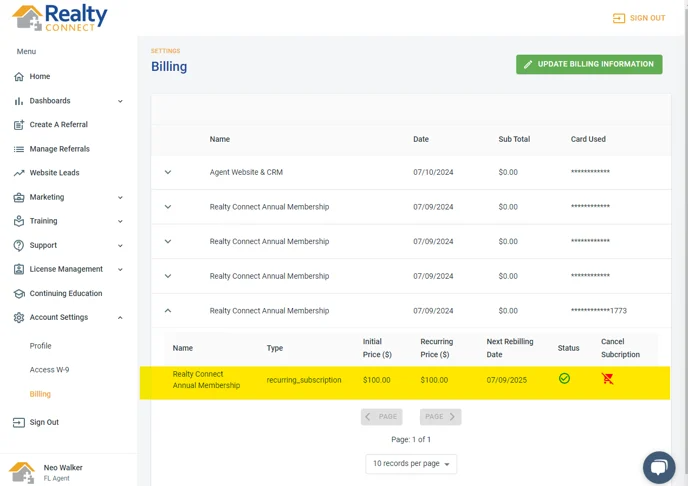
- Go to the "Account Settings" tab.
- Click on the "Billing" section
- Find your membership and select the down arrow to open up the details
- Select "Cancel Subscription"
If you would like to cancel your membership effective immediately, please send an email to admin@realtyconnect.com detailing your request and we will respond and complete the request within 24 business hours.
NOTE: If you cancel from within your Dashboard you may receive a call from the Managing Broker for a feedback request.Was this article helpful?
That’s Great!
Thank you for your feedback
Sorry! We couldn't be helpful
Thank you for your feedback
Feedback sent
We appreciate your effort and will try to fix the article