Once you have placed your referral we recommend going into your Agent Dashboard and filling out/updating your W-9. In order to get paid, the W-9 must be completed first.
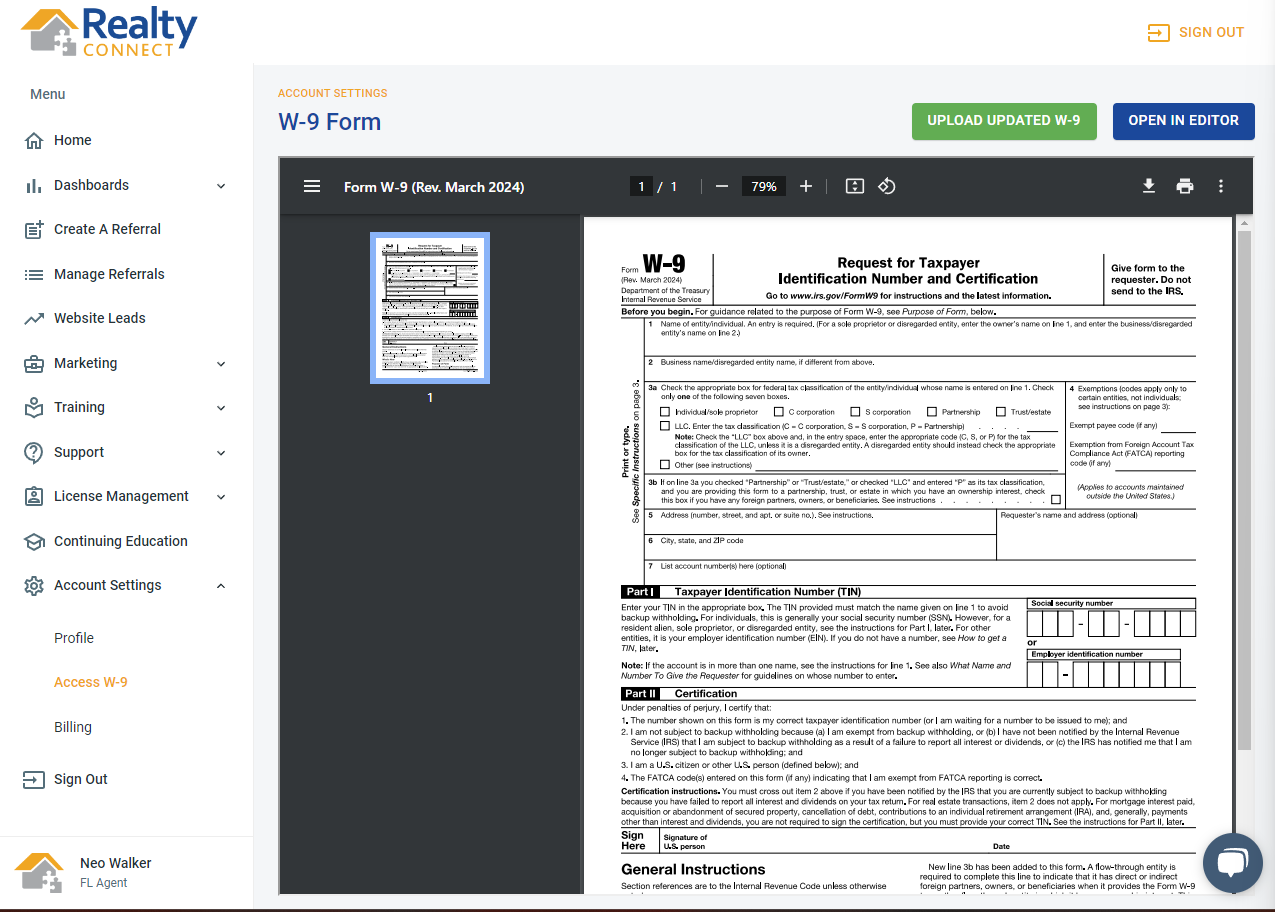
You can access and update your W-9 by:
- Go to your Agent Dashboard (MyRealtyConnect.com)
- Log into your dashboard
- Select "Account Settings"
- Select "Access W-9"
- (To edit or update) Select "Open in Editor" (blue button) at the top right hand corner
- IMPORTANT: Do not forget to upload your W-9 to the Admin team you'll need to select the button that says "Upload Updated W-9"
Once Realty Connect has received your check they will reach out to confirm how you want to be paid. Once there is a completed W-9 from you and you have selected whether you want your check via mail or electronically our Executive Admin will complete the payment process based on your chosen method.
CAUTION: DUE TO USPS IF SENT BY MAIL PLEASE ALLOW 3 WEEKS FOR THE CHECK TO ARRIVE AS WE HAVE SEEN MAJOR DELAYS.

NOTE: Realty Connect uses a form of e-check called Deluxe Payment Exchange
Was this article helpful?
That’s Great!
Thank you for your feedback
Sorry! We couldn't be helpful
Thank you for your feedback
Feedback sent
We appreciate your effort and will try to fix the article